Multisite CMS: one shared platform or separate installations?
Several brand, regional or market sites can run on separate CMS installations, one shared instance, or one codebase deployed per site. A comparison of the three, with a three-market worked example and a shared, local and owner worksheet.

Running several websites on one content platform comes up when a company adds a brand, opens a market or takes a regional site in-house. Buyers usually hear two answers: consolidate everything into one multisite CMS, or leave each site on its own installation. A third setup sits between them, and a larger estate can mix all three.
This guide is for digital and product leaders responsible for several brand, regional or institutional sites, including funded companies expanding into new countries. It compares the three setups, works through a three-market example, and ends with a worksheet for deciding which content is shared, which stays local, and who owns each part.
WAYF is an official Payload partner and top contributor, so we have an interest in this topic. Payload is the implementation we describe in detail. The architecture choice applies to any CMS.
The short answer.
- One shared instance suits sites that are structurally similar, reuse much of their content and are run by one central team. You get one admin and one upgrade; content can be written once where the model deliberately makes it shared. An incident in the common CMS can affect every site.
- Separate installations suit sites with different owners, different functionality or a legal boundary between them. Every site is upgraded, secured and paid for on its own, and content meant to be identical has to be copied or synchronised.
- One codebase with isolated deployments sits between them. Every site runs the same content model and components, and each keeps its own database, release and rollback. It costs more to operate than one instance, and shared content becomes an integration task.
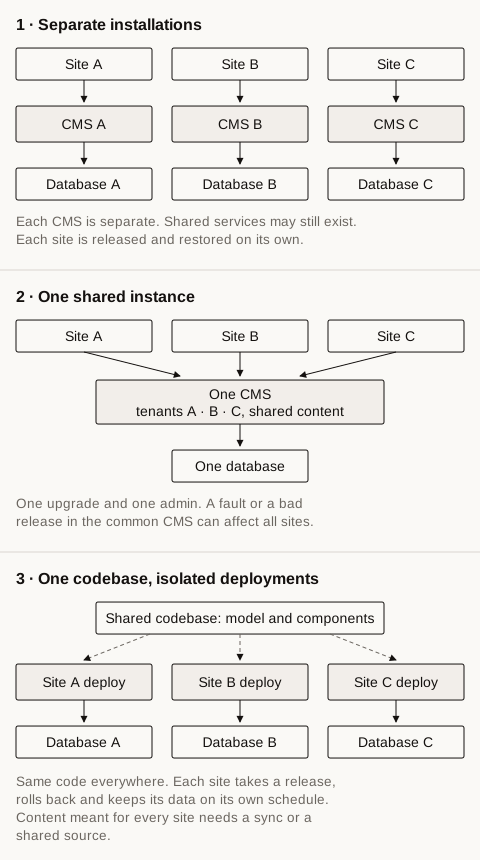
The three setups. Shaded boxes are running CMS instances.
Multisite and multi-tenant describe different things
A multisite CMS is any setup that serves several sites from one CMS arrangement. That is the outcome a buyer wants. Multi-tenancy is one way to get it: one installation serves several tenants and keeps their content and permissions apart. Our glossary entry on multi-tenant CMS defines that model and its trade-off in plain terms.
Vendors use the words loosely. Optimizely’s documentation calls its CMS multi-tenant because one running instance can host several websites that share a database. WordPress Multisite runs a network of sites from one installation, giving each site its own database tables while the user table is shared. Drupal’s multisite feature serves separate sites from one codebase, each with its own database, configuration, files and domain. All three are called multisite, and they sit at different points on the spectrum below.
A single brand selling into three countries may need one site with three languages rather than three sites. Several sites start to pay off when the markets need different structure, offers or domains, or when different people own them.
Three ways to run several sites
Separate installations
Each site has its own CMS instance, database and release pipeline, sometimes on different platforms. An estate looks like this when each brand or region chose its own tools, or when sites arrived through acquisitions.
A failure or release in one installation can be contained to that site when its infrastructure and integrations are separate. Each owner sets its own pace, and a site can be sold, shut down or replatformed without changing the other installations.
The costs repeat per site. Every installation needs its own upgrades, security patches, hosting and admin accounts. Content that should be identical everywhere, such as product facts or legal text, is copied and drifts when one copy changes. Editors who work across sites log into several admins.
One shared instance
One CMS installation serves every site. Depending on the product, the sites are tenants, site definitions or network sites. WordPress Multisite, Optimizely’s multi-site setup and Payload’s multi-tenant plugin all follow this model.
You maintain one installation and one admin. Content deliberately modelled as shared can be written once and used by every site; a new site needs its own definition or tenant and configuration. Permissions per site are managed in one place.
The consolidation also concentrates risk. An outage or bad release in the common CMS can affect every site. Content-model changes have to be agreed across site owners because every site runs the same schema. A shared database constrains where each site’s data can be stored, which may rule this setup out under a regional hosting requirement. Permission design also gets harder as the editor population grows.
One codebase, isolated deployments
The content model, components and CMS configuration live in one repository, and each site, or each group of sites, runs its own deployment with its own database. Drupal’s multisite is a close relative, with one important difference: it serves every site from one deployed codebase, so a code change reaches all of them together. In the setup described here, the shared code is deployed separately per site, so each site can take a release on its own schedule.
You keep one content model and one component library. Releases can be staggered and rolled back site by site, each site’s data can live where it has to, and a failure in one deployment stays there.
In exchange, there are more environments and databases to run, monitor and back up. Content meant for every site needs a synchronisation job or a shared source that every deployment reads. Reporting and search across sites have to be joined up deliberately.
How the three compare
| Question | Separate installations | One shared instance | One codebase, isolated deployments |
|---|---|---|---|
| Content every site uses | Copied or synchronised between systems | Written once, referenced by every site | Synchronised, or read from a shared source |
| Permissions | Managed per installation | Per tenant, in one admin | Per deployment, same role model everywhere |
| Preview | Each installation previews its own site | Preview URL per site, built in the frontend | Each deployment previews its own site |
| Rolling out a code change | Built and released per site | Reaches every site at once | Staggered, site by site |
| Rolling back a bad release | One site | Every site | One site |
| Reach of an outage | One site | Every site | One deployment |
| Upgrade effort | One upgrade per site, possibly per platform | One upgrade | One code change, deployed per site |
| Costs that grow with each site | Hosting, upgrades, patching and licences | Mostly content work and configuration; hosting grows with total load | Hosting, database and monitoring per site |
| Where data lives | Per site | One location for every site | Per deployment |
A worked example: one product line in three markets
This example is illustrative. It is not a client project, and it describes how each setup handles the requirements rather than a tested build.
A company sells one product line in the UK, Germany and Japan. Each market has its own domain, two local editors, local offers and events, and its own legal pages. Product specifications, datasheets and photography come from a central product team in English and are translated for each market. Launches are planned globally and go live market by market.
Global product facts. The product team writes them once. In a shared instance they sit in a collection every site reads, and translations live beside the source text as locales; Payload localizes at the field level, so one product document carries every language. With isolated deployments the facts need a source every deployment can read, such as a product service, or a job that copies approved facts into each site’s database. Separate installations copy them by hand or through an integration, and the copies drift when one site is updated and another is not.
Local offers. These belong to one market and its team, and every setup handles them. In a shared instance they carry a tenant; access and publication rules must keep the German team from publishing an offer to the UK site.
Shared media. Product photography serves all three markets. A shared instance can use one media library. Isolated deployments can reference a shared asset store; separate installations need either duplicate uploads or a shared source.
Translation ownership. The product team owns the English source; each market owns and signs off its translation. In Payload the German editor edits the German values of the same product document. Limiting an editor to one language takes access-control code that you write.
Permissions. Local editors manage their market’s pages, offers and translations. The product team manages product facts, and a legal owner in each country manages legal pages. A shared instance expresses this as tenant membership plus roles. Isolated deployments and separate installations keep a user list per site, so accounts are managed three times unless single sign-on maps them from one directory.
Preview. Editors want to preview on their own market’s domain. In a shared instance the frontend has to build a preview URL for each tenant. Isolated deployments and separate installations each need preview configured for their own site.
Rollout. A new comparison component goes live in the UK first, then Germany, then Japan. In a shared instance the code reaches all three at once, so staggering needs a way to enable the component per market. Isolated deployments release the UK, watch it, then release the others. Separate installations implement the component in each site’s codebase, unless they share a component package.
Rollback. A release breaks the German site. Rolling back the shared CMS changes every market; isolated deployments can roll back Germany alone.
Costs that grow with each market. In a shared instance, a fourth market is a new tenant, its configuration and its editors. With isolated deployments it is another deployment and database to run, monitor, back up and upgrade. With separate installations it is another installation to host, secure and upgrade on its own.
The worksheet: shared, local and owner
List your own content and capabilities in the first column, then decide the other three. Rows marked shared pull towards one instance. Local rows with different owners, a legal boundary or their own release needs pull towards isolation.
| Content or capability | Shared or local | Owner | What it asks of the setup |
|---|---|---|---|
| Product specifications and datasheets | Shared | Central product team | One source that every site reads |
| Product translations | Local, per language | Market editor | Language-level ownership and sign-off |
| Offers, pricing and events | Local | Market team | Content scoped to one site |
| Legal pages | Local | Legal owner per country | Content scoped to one site |
| Case studies | Shared, selected per market | Marketing | Shared pool, local selection |
| Product photography | Shared | Brand team | One media library or asset store |
| Navigation | Local, on shared page types | Market team | Shared components, local structure |
| Components and page types | Shared | Engineering | One codebase |
| Users and roles | Shared role model, local membership | Platform owner | Scoped permissions, ideally single sign-on |
| Releases and rollbacks | Shared or per site | Platform owner | Decides between one instance and isolated deployments |
What we would recommend for this example
If all three markets can be hosted in one location and one central team runs releases, a shared instance fits. Give each market a tenant, keep product facts in a shared collection, and put translations and offers under the market editors. The company gets one place for product facts, permissions per market and one upgrade.
If one market must be hosted inside its own region, or its team needs its own release schedule, give that market its own deployment of the same codebase and feed it the shared product facts. The other two markets can stay on the shared instance.
If the markets differ only by language, check first whether one site with three locales covers the need.
When isolation is worth the operational cost
Isolation costs the same things every time: more environments to patch, back up and monitor, and a synchronisation for anything meant to be shared. It pays for itself when one of these holds.
- A legal or hosting boundary. Data for one site has to stay in a particular region or on particular infrastructure.
- Different owners and release cadences. A business unit that ships every week sits beside one that ships every quarter, and neither should wait for the other.
- An outage that must not spread. One site handles transactions or support, and a marketing release must not take it down.
- Divergent functionality. One site needs integrations or plugins that the others should not carry.
- An estate still changing shape. A brand is being acquired, sold or merged, and its site may leave the platform.
Isolation does not have to cover every content type. A platform can keep product facts shared while legal pages and offers stay local, whichever setup runs underneath.
What Payload’s multi-tenant plugin supplies, and what you build
Payload’s multi-tenant plugin is first-party and open source. It implements the shared-instance model and leaves the site-level architecture to you.
| Capability | Where it comes from |
|---|---|
| Tenant field on the collections you choose | Plugin |
| Tenant selector in the admin; list views and relationship fields filtered by tenant | Plugin |
| One document per tenant for site-level settings | Plugin |
| New documents assigned to the current tenant | Plugin |
| Writes that name a tenant the user does not belong to are rejected, including drafts and autosave | Plugin |
| Roles and rules beyond tenant membership | Core access control, written in code |
| Field-level localization, drafts, versions and live preview | Core |
| Mapping each domain to its tenant in the frontend | Your code; the plugin docs show a Next.js rewrites example |
| Content every tenant shares | Your design, for example a collection left out of the plugin, which gets no tenant field |
| Preview URLs per tenant, sitemaps and search per site | Your code |
| Limiting an editor to one language | Your access-control code |
| Single sign-on over SAML | Payload enterprise feature, or a custom auth strategy |
| Deployment, rollback and backups | Your infrastructure and release process; a shared instance has common deployment and backup boundaries |
When a tenant is deleted, the plugin attempts to remove that tenant’s documents by default. The cleanupAfterTenantDelete option can turn this off, so the tenants collection needs strict access control and a deliberate retention policy.
What we built for Ingersoll Rand
Ingersoll Rand runs a global multi-brand content platform on a custom Next.js frontend. When its China sites had to move off Oracle Content Manager, the region needed a CMS that could run inside AWS China, a regulatory requirement for the rollout. Contentstack, which serves the other regions, was not available there.
We introduced a content provider layer so the frontend reads one shared content contract, then put China on Payload, deployed in AWS China. That Payload workspace serves more than 20 brand tenants in one shared environment, with role-based access tied to tenants and a publication workflow for page collections. The other regions stayed on Contentstack.
The estate mixes the setups. Brands share one instance inside a region, the region with a hosting requirement runs its own deployment, and the frontend code is shared through the provider contract. Our content governance guide covers how permissions and approvals work across that many brands.
Choosing a setup
Fill in the worksheet with your own content before comparing products. The rows marked local, and the reasons they are local, decide how much isolation you pay for. The rows marked shared decide how much you save by consolidating.
Consolidating existing installations follows the same worksheet. Move the content marked shared into its new home first, bring sites across one at a time, and keep separate the sites whose rows call for isolation. Choosing the CMS product itself comes after this decision; our enterprise CMS comparison covers that step.
If you want a second opinion on that worksheet, we can review it with your team and map it to a platform.
FAQ
-
What is a multisite CMS?
A multisite CMS is a setup that serves several websites, such as brand, regional or market sites, from one content management arrangement. It can be one shared installation with a tenant per site, or one codebase deployed separately for each site. Separate installations per site are the alternative it is usually compared with.
-
What is the difference between multisite and multi-tenant?
Multisite describes the outcome: several sites served from one CMS arrangement. Multi-tenant describes one way to get there, where a single installation serves several tenants and keeps their content and permissions apart. A codebase deployed once per site also gives you a multisite estate, and it is not multi-tenant.
-
Can Payload run multiple sites?
Yes. Payload's official multi-tenant plugin adds a tenant field to the collections you choose, a tenant selector in the admin, tenant-filtered list views and a check that rejects writes to tenants a user does not belong to. The frontend maps each domain to its tenant. A team can also deploy the same Payload codebase separately for each site.
-
Is a multisite CMS cheaper than separate installations?
A shared instance consolidates upgrades, patching and hosting, while a fault in the common CMS can affect every site. One codebase with isolated deployments keeps one model to maintain while each site still needs its own hosting and database. Compare the running costs per site with the reach of a shared-platform incident.
Sources
- Payload CMS, multi-tenant plugin
- Payload CMS, localization
- Payload CMS, access control
- WordPress, Multisite / Network
- Drupal, multisite
- Optimizely CMS, set up multiple sites
- WAYF, Ingersoll Rand case study
Sources rechecked 29 September 2026. The three-market example is illustrative.
We're booking content platform
engagements for 2026.
Twenty-five minutes to walk through the work and decide if we're the right team for it. Scoping and a fixed price come after.