Best CMS for Astro: choosing the editorial workflow
Compare Payload, Sanity, Storyblok and Contentful for an Astro marketing site, with a five-task evaluation sheet for editors and developers.

For an Astro marketing site, Payload is a strong choice when you want a content model and admin experience tailored to the business, with control over the code and hosting. Storyblok suits teams that want to compose pages in a visual editor. Sanity gives developers a configurable editorial studio with a hosted content service. Contentful belongs on the shortlist when its managed content platform and governance features match the organisation’s requirements.
The best CMS for Astro depends on the work an editor needs to complete. Test a page change through preview, review and publication before committing to a platform. The final step matters: a saved CMS entry and the page a visitor receives can be at different stages of a deployment.
WAYF is an official Payload partner and top contributor and maintains a Payload + Astro starter. That experience informs our recommendation. This comparison draws on the linked documentation and public starter code; it does not claim a hands-on benchmark of every platform.
The worked example below follows a real local run of the starter, with fictional content and screenshots of editing, preview, translation, publication and restoration.
A shortlist for marketing and editorial sites
These four CMSs cover different approaches to structured content and editorial control. Astro also supports many other integrations. This shortlist is intended to make a buying decision manageable; it is not an exhaustive ranking.
| Option | A good reason to shortlist it | Confirm with your own page |
|---|---|---|
| Payload | TypeScript-defined content, configurable access rules and a tailored admin UI; choice of hosting | The permitted page blocks, draft access, preview integration and publishing responsibilities |
| Storyblok | Visual, component-based page editing is central to the marketing team’s work | How the Astro components behave in the Visual Editor, plus the plan’s role and localisation limits |
| Sanity | A custom Studio and structured content reused across pages or channels | The schema, draft perspective, visual-editing integration and translation model |
| Contentful | A managed content service with environments and governance features relevant to the organisation | The chosen plan’s permissions, locales and workflow features, and the Astro preview implementation |
| Astro content collections | Authors are comfortable with repository-based content and code review | Whether Git-based review, media handling and deployment are acceptable to everyone who publishes |
For a wider explanation of the platform categories, see our CMS comparison. To check the four shortlisted platforms feature by feature, open the preselected CMS comparison tool. The decisions below are specific to using Astro as the website frontend.
Set the publishing model before comparing preview features
Astro can generate pages at build time or render routes on demand. Its rendering documentation explains the adapter and route configuration needed for server-rendered output.
On a prerendered site, a CMS publication normally needs a build and deployment before the new content reaches visitors. A webhook can start that process. The implementation should expose failed builds, avoid publishing stale results over newer ones and give the editor a clear way to verify completion.
An on-demand route can read content when a request arrives. Its freshness still depends on the application’s queries and caches. A hybrid setup can keep public pages prerendered while serving an authenticated preview route on demand.
This distinction changes the test you should run. Preview must resolve the intended draft, including referenced content and the selected locale. Publication must update the public page. Agree how both will work, and record who responds when a webhook, query or deployment fails.
Changing a CMS alone does not establish a faster site. Measure the finished pages with their images, scripts, hosting and cache behaviour.
Payload: shape the CMS around the site
Payload’s content model and access rules live in the application code. Its versions and drafts support editorial work such as saving changes before publication and restoring previous content. The project still needs access rules that reflect who may edit and publish each kind of content.
For an Astro frontend, Payload’s admin and backend run as a Next.js application and serve content through APIs. Payload’s Live Preview documentation describes the CMS-side preview configuration; the frontend must render the correct draft and respond to updates. A separate Astro process should not be assumed to share Payload’s Local API runtime.
This arrangement is useful when the page model includes business-specific fields, reusable sections or permissions that depend on the document and user. An editor can work with the controls the implementation exposes. New section types still need frontend components and a content definition.
Our Payload plugins guide covers optional SEO, redirect, form and search packages, including compatibility and licence checks. Include hosting, database, media storage and delivery services in the project budget.
Hosting can be operated by your team or a managed provider with implementation support. At our September 24 check, Payload’s Cloud notice says deployment of new Cloud projects is paused. Plan the actual hosting, database and media services for a new project rather than assuming that particular product is open for signup.
What the WAYF starter supplies
The public WAYF repository contains separate Payload and Astro applications, PostgreSQL, shared UI components and generated Payload types. Its documented starting point includes block-based pages, live preview, Polish and English locales, Storybook, forms, media handling and database migrations.
The agent-assisted development instructions are also part of the starter. They describe a new-section sequence: build the component in Storybook, get design approval, then connect its Payload block, Astro adapter, generated types and migration. That design gate concerns development of a new section. It should not be mistaken for an editorial approval workflow inside the CMS.
Before adopting it, inspect the actual collections, access rules and deployment settings. Decide which blocks editors can use, how translations are maintained, who publishes, where uploads persist and how content is restored. The starter provides a working structure for these decisions; each website still has its own requirements.
A page change in the starter: tested September 26, 2026
We used a fictional workshop page to check a common request: change a campaign headline and description, prepare a Polish translation, publish, then recover the earlier page. The test ran locally on starter commit af791e2, using its locked Payload 3.81.0, Astro 6.4.4 and Next.js 15.4.11 dependencies, with PostgreSQL 17.11 and Node 24.19.0.
These versions identify the tested snapshot. Before a production deployment, apply current security updates, including Payload’s September 18 notice, and repeat the checks against the resulting build.
1. Save a change while keeping the published page available. We seeded the original page and draft headline through the REST API, then edited the description in the admin UI and clicked Save Draft. The signed-in user was an admin; a separate content-editor role was not configured. The UI reported “Draft saved successfully” and showed Changed, with a note that the live page still used the last published version.
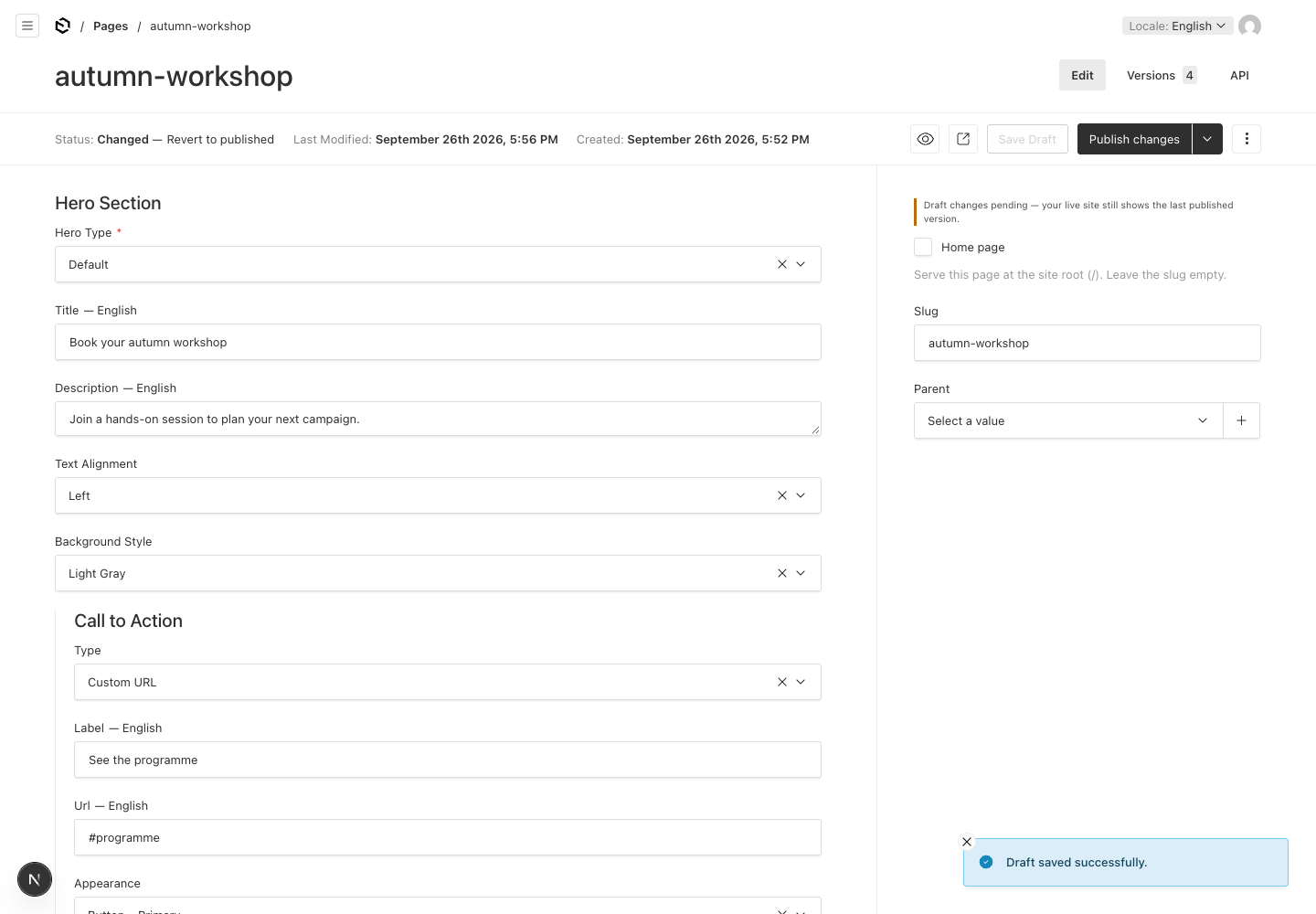
Read the status beside the publishing controls: the saved draft contains “Book your autumn workshop”. Saving it has not published it.
2. Compare preview with an anonymous visitor. Live Preview rendered the revised headline and the description entered in the UI. A separate, signed-out browser still showed “Plan your autumn workshop”. We also checked the rendered HTML: draft preview carried noindex, and the public route returned the original content. An anonymous API request did not expose the revised draft. noindex alone would not establish access protection.
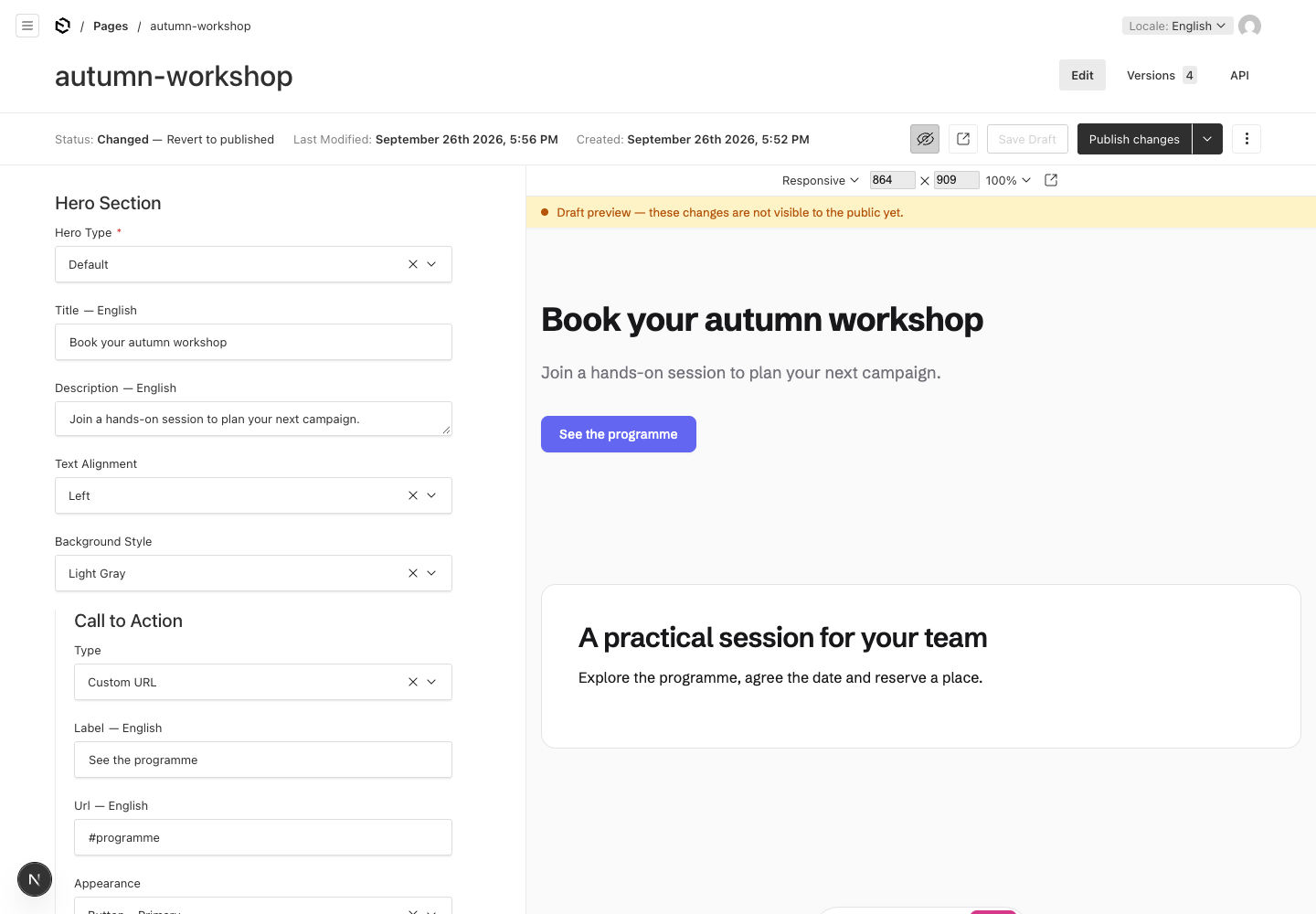
The preview on the right matches the draft fields on the left, including the newly edited description.
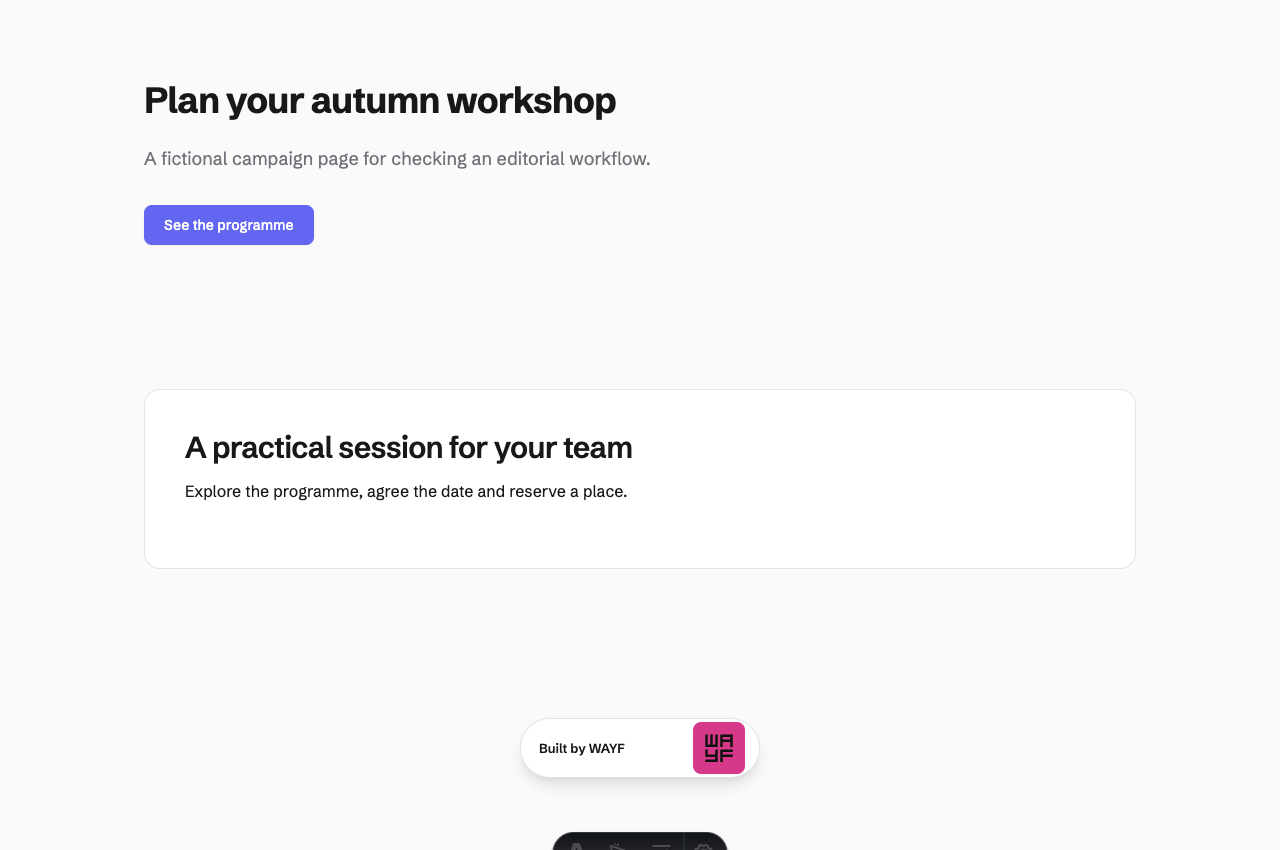
At the same stage, an anonymous visitor receives the earlier headline and description.
3. Check the translation and its fallback. After adding Polish draft text through the API, we switched the admin’s locale to Polish. Preview showed “Zaplanuj jesienne warsztaty”. The untranslated CTA and lower block remained in English through fallback. That makes untranslated fields visible during review; a team needs to decide whether mixed-language output is acceptable before publication.
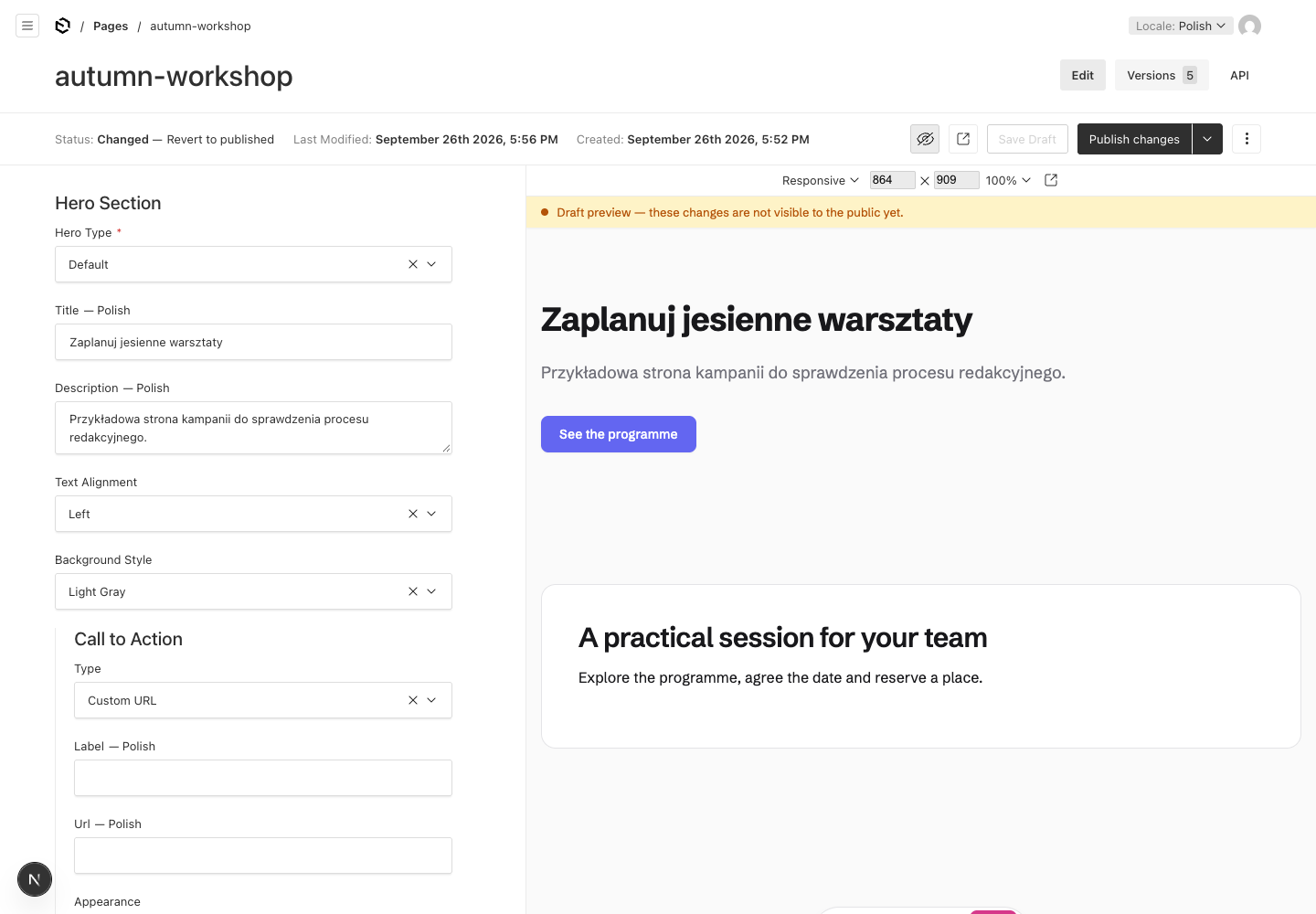
Compare the Polish heading with “See the programme”: selecting a locale does not supply missing translations.
4. Check who can publish. A second-person approval hand-off was not demonstrated. This starter snapshot has no configured editor/publisher role split; our admin could publish directly. An anonymous publication attempt returned HTTP 403, which establishes only that particular boundary. For a team requiring approval, add the agreed roles and test the restricted user’s publication attempt separately. Our Payload RBAC example covers a separate permission fixture.
We clicked Publish changes with English selected. Both the English revision and Polish translation became visible on their public routes. Publication therefore affected the document’s locales together in this configuration. The tested campaign route uses server rendering and updated without an Astro rebuild; production caches, webhooks and prerendered routes need their own delivery checks.
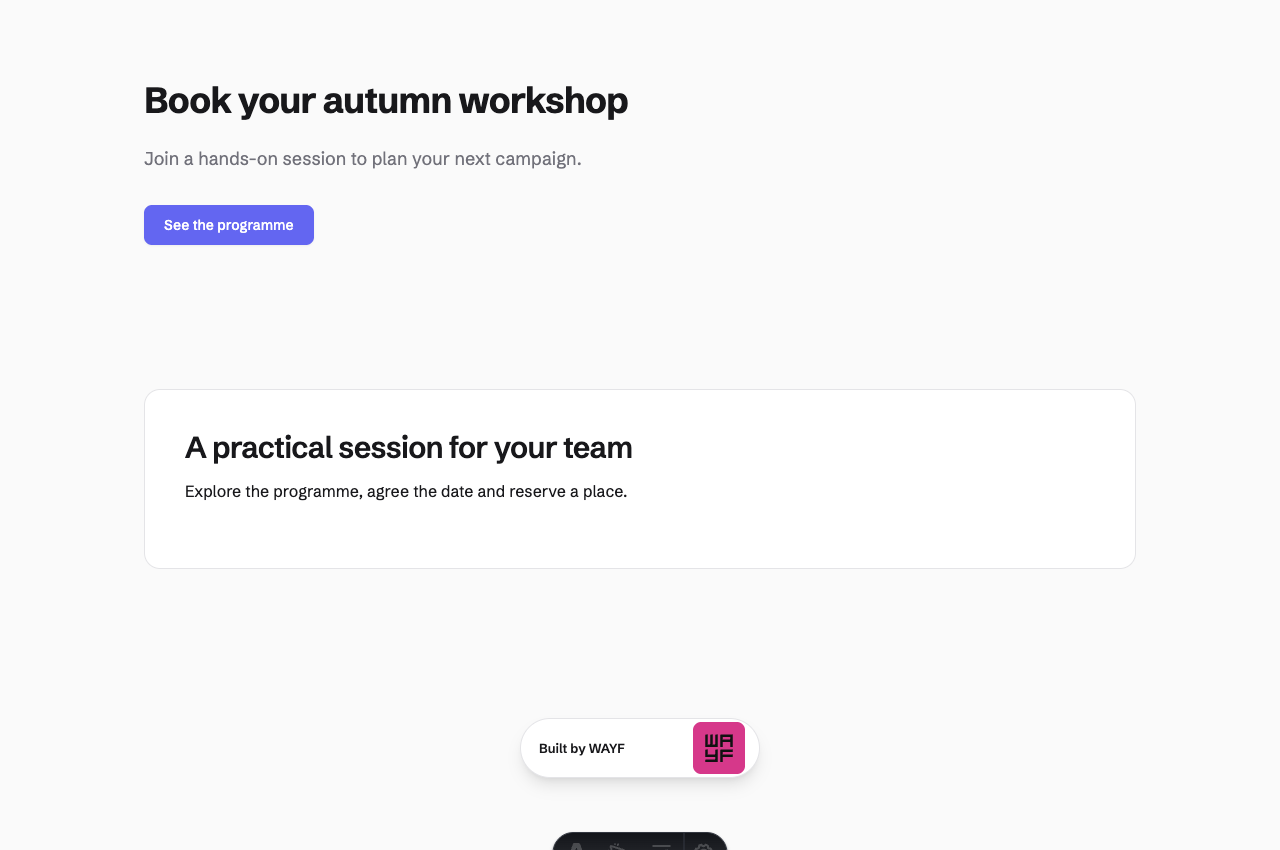
The anonymous page now matches the earlier draft. We checked the Polish public route too.
5. Restore and recheck both languages. In Payload’s version history, we selected the original published version, clicked Restore this version and confirmed. The public English page returned to its original headline and description. That version predated the Polish translation: restoring it also removed the later Polish text, so the Polish route displayed English fallback. Check every affected locale when recovering a multilingual page.
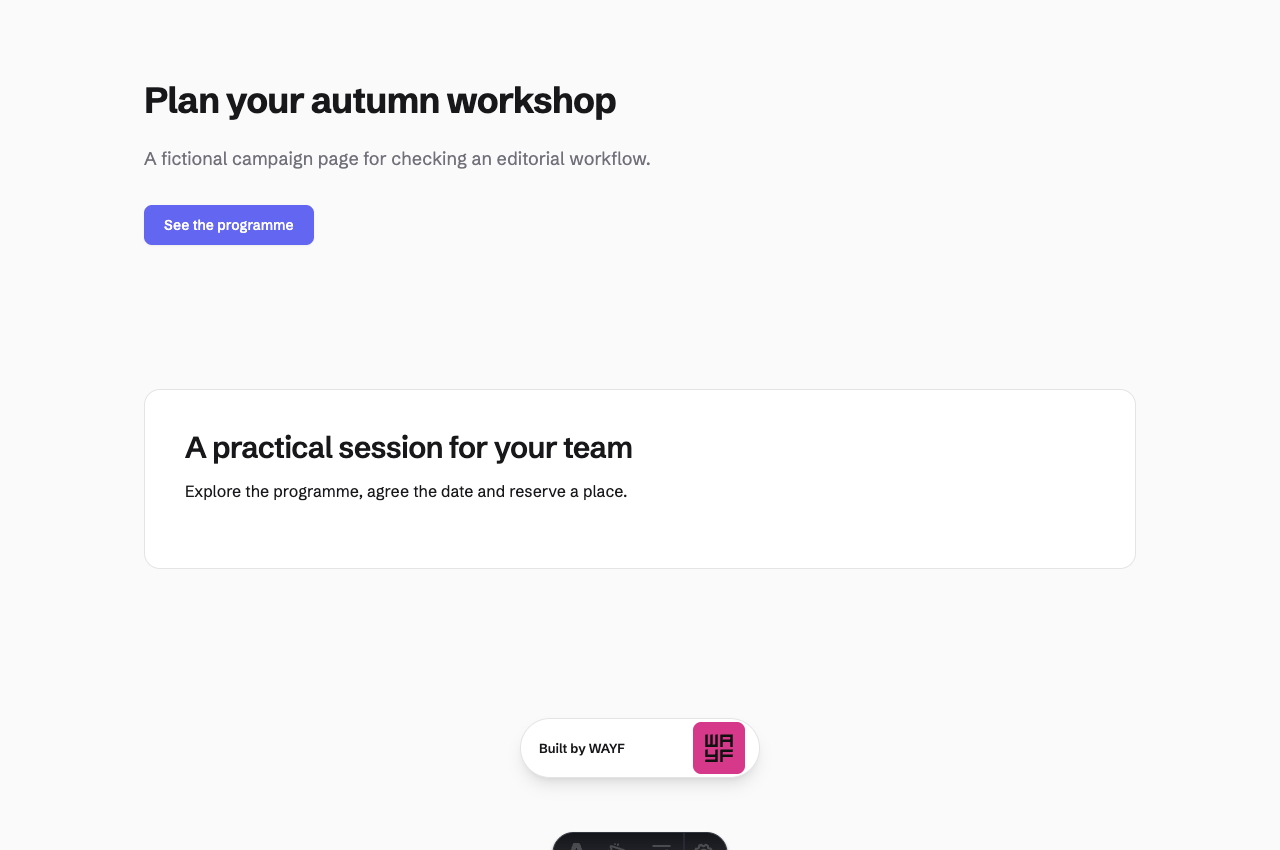
Restoration recovered the earlier document. It also reversed translation work saved after that version.
This run verified saved drafts, the local preview/public distinction, locale fallback, admin publication and content-version restoration. It did not test image replacement, block reordering, shared references, a second reviewer, production delivery or database backup recovery. The CTA in this page was an inline field. Use the evaluation sheet below to extend the exercise to your site’s actual content and responsibilities.
Storyblok: evaluate editing in the rendered page
Storyblok’s Astro SDK connects Astro components to its content and Visual Editor. This makes it a useful candidate when marketers need to see the page while editing component-based content.
Use one representative page in the evaluation. Check a nested component, a reusable item and an image change. The visual controls should correspond to what the editor is allowed to alter, including which sections can be added or moved. Rendering an arbitrary component correctly still depends on the frontend implementation.
Storyblok documents several localisation approaches. Choose one that matches translation ownership and publishing needs. Check the current plan against editor seats, custom roles, locales, API usage and any required workflow features before estimating the recurring cost.
Sanity: configure the editorial workspace
Sanity separates its configurable Studio from its hosted content service. Its Astro integration documentation covers queries, images, rich text, static and server rendering, and visual editing with the Presentation Tool.
That flexibility suits a site whose content needs to appear in several contexts. A customer story might supply a full article, a homepage reference and a sector-specific quotation. Model those relationships, then test how easily an editor can find and change the right item.
Visual editing needs the frontend integration, draft access and preview configuration described in the relevant guide. Check the supported Astro version when following an example. Sanity’s localisation guidance offers field- and document-level modelling approaches; the choice affects queries, references and how translations are published.
Budget against the current plan and usage allowances, including the permissions and release features the team needs. Studio customisation and the website integration belong in the implementation scope.
Contentful: match governance to the selected plan
Contentful’s preview documentation distinguishes the content used for preview from published delivery. Its live-preview integration also requires work in the frontend; enabling a CMS feature does not automatically wire every Astro component.
It is worth evaluating when the organisation already uses Contentful or needs its content environments and governance model. Show how a proposed site fits those existing practices, including who can change the model and how changes reach each environment.
Review locale fallback behaviour and the current plan with a concrete number of editors, locales and environments. Distinguish included functionality from separately priced or enterprise features. A familiar managed service can be a sensible choice; the site still needs its content model, preview, deployment and handover designed around the people using it.
When content collections are enough
Astro’s content collections support structured content and validation. For a developer-maintained publication, local Markdown and a Git review process may already provide the necessary workflow.
Content collections do not by themselves supply a CMS editor, a media library or editorial permission roles. If authors need those tools, compare a CMS or Git-backed editing layer with the cost of building and supporting your own. Include the time spent helping authors publish, alongside any subscription or hosting charges.
EmDash takes a different approach by putting the CMS in the Astro application. Our separate review covers its documented capabilities and evaluation points. It is worth considering when that integrated architecture suits the project; verify its current release and required features before making a commitment.
Run the same five tasks with each finalist
Use a fictional campaign page with a headline, image, shared call-to-action and second-language version. The following table is a reusable acceptance plan for each finalist. Our starter-specific observations are recorded in the worked example above; the remaining platforms and steps need their own tests.
| Task | Evidence to capture |
|---|---|
| Edit the page | A content editor changes the headline, selects an image and moves an allowed block. Record any developer intervention and validation errors. |
| Preview the draft | The preview shows the intended page, referenced CTA and locale. Check an unauthorised browser separately; draft content must remain protected. |
| Hand off for review | The reviewer can see the proposed change. Attempt publication with a role that should be restricted. Record which steps are native, configured, custom or manual. |
| Update a translation | Change the second-language headline and check fallback behaviour. Confirm whether publication affects one locale or several. |
| Recover a publication | Restore an earlier content version and verify the public route after the relevant build or cache step. Check what happens to referenced content and media. |
For every task, record pass, partial or not demonstrated, along with the configuration and evidence. A feature you did not test should remain unverified. Keep content version recovery separate from deployment rollback and database backup recovery.
Download the editable evaluation sheet and fill it in during the session. Our content-governance guide gives more detail on assigning editorial responsibilities.
Two useful starting decisions
A small marketing site with one or two publishing owners. Start with the editing experience they need. Repository-based content may be sufficient for technical authors. For non-technical editors, shortlist Payload when a tailored block model and ownership fit the team, and Storyblok when visual page composition is the strongest requirement. Test the same page in both before adding more products to the shortlist.
A multilingual team with regional editors and a central reviewer. Write the permission and translation matrix first. Payload is worth evaluating for application-defined access rules; Sanity for a custom editorial workspace and reusable structured content; Contentful or Storyblok when their managed workflow and governance features fit the agreed process. Verify the precise plan and implementation for each. A platform’s product description cannot establish that your approval policy is enforced.
For either project, include hosting, media delivery, support, implementation and a realistic growth case in the quote. Ask for a sample content export containing references, assets and translations, then inspect what another system would need to import it. Preserve the content model and the exit requirements in the handover documentation.
Sources checked September 24, 2026. Product links above point to primary documentation. Prices, feature gates and integration versions should be confirmed for the project being commissioned.
We're booking content platform
engagements for 2026.
Twenty-five minutes to walk through the work and decide if we're the right team for it. Scoping and a fixed price come after.