EmDash CMS review: enterprise fit vs Payload
EmDash 1.3.1 is current. This review covers its Astro architecture, recorded local evaluations through 1.2.0, and the approval, permission and multi-brand requirements to compare with Payload.

EmDash CMS has my attention. It puts a CMS inside an Astro project, gives administrators a visual schema builder, generates TypeScript types for developers, and includes an MCP server with its own authorization model. MCP, the Model Context Protocol, is the interface AI agents use to read and change content. That is a coherent set of choices.
EmDash released stable 1.0 on 28 September 2026, with the non-prerelease package 1.0.1 published that day. The first practical evaluation below used 0.42.0, before the stable release. A second run on 1 October repeated it on 1.0.1 and added a backup restore and a WordPress import. 1.2.0 followed on 6 October, and a short check on 7 October retested what it changed. 1.3.0 was published on 15 October and 1.3.1 on 18 October. The 1.3.x claims below are release-note and documentation updates, not new hands-on tests. Each section names the version it tested. A production deployment still needs its own acceptance test.
The short verdict. For a single Astro publication with a small editorial team, EmDash is worth a prototype now. For an organization that needs a review step before publication, permissions scoped to a brand or region, single sign-on through a corporate identity provider over SAML, or contractual support, Payload has the stronger documented position. I would put EmDash on a shortlist for the right Astro project, then run a focused prototype before making it the content platform.
At WAYF, we know Payload much better. We have built and contributed to Payload projects, including enterprise content platforms, and we are an official Payload partner and top contributor. That experience shapes the comparison below. It also makes me interested in EmDash, because it approaches some familiar full-stack CMS problems from the Astro side.
A recorded, agent-assisted local evaluation on 28 September 2026 took one post through editing, preview, publication, a content-model change, a revision restore and a full export into a second site using EmDash 0.42.0. A second recorded run on 1 October repeated the publishing and transfer steps on 1.0.1, restored a database backup into a fresh site, and imported a synthetic WordPress site. A check on 7 October retested the import, redirect and preview changes in 1.2.0. The results are below. Claims outside those sections come from the documentation, release notes and repository; no client deployment or editorial-team trial is represented here.
EmDash and Payload at a glance
| Decision | EmDash CMS | Payload |
|---|---|---|
| Where the CMS app runs | Inside the Astro app | A Next.js app, serving any frontend via REST and GraphQL |
| Content model | Administrators change collections and fields in the admin; developers generate types from the live model and export it as a seed file | Developers define schemas in TypeScript and ship migrations |
| Editorial workflow | Draft, scheduled and published states, revisions and signed preview links; no built-in review state | Drafts, versions and scheduled publishing in core; approval workflows marketed as an enterprise feature |
| Application access | Astro Live Collections, REST, CLI, built-in MCP | Local API, REST, GraphQL, first-party MCP plugin |
| Permissions | Five fixed hierarchical roles plus token scopes | Programmable operation, collection, document, and field access functions |
| Multitenancy | No documented first-class feature | Official multi-tenant plugin |
| Localization | Each translation is a separate entry with its own slug, status, and revisions | Field-level localization |
| Plugins | Native plugins or capability-gated sandboxes | Application code, hooks, and plugins run in the Payload application |
| Recovery | Revision restore, site packages for moving a whole site, raw database backups; JSON backups cannot be restored | Version restore in the admin; database and media backups follow the hosting you choose |
| Hosting | Cloudflare or Node with several SQL and media-storage options | Suitable Next.js infrastructure with MongoDB, PostgreSQL, or SQLite |
| Licence and cost inputs | MIT. Hosting, an email provider, custom plugins, and Cloudflare Workers Paid for the stronger plugin sandbox | MIT. Hosting, database and media storage; enterprise features through a demo request |
| Maturity | Stable 1.0 released on 28 September 2026; 1.3.1 is current, while the local evaluations below cover 0.42.0 and 1.0.1, with a check of the 1.2.0 changes | Public repository since 2021, broader documentation and commercial enterprise options |
What EmDash CMS is
EmDash is an open-source CMS built as an Astro integration, and its homepage describes it as coming from Cloudflare. Its architecture documentation describes the CMS, admin panel, database access, and site as one application. Astro Live Collections query the live content in the same runtime, loading it on demand instead of only during a build.
EmDash requires Astro. Its repository describes it as a full-stack TypeScript CMS, with REST and CLI access for integrations alongside the native Astro queries.
The project presents itself as a successor to WordPress. Its README says it rebuilds WordPress’s strengths in extensibility, admin experience and plugins on serverless, type-safe foundations. The admin includes a WordPress importer that analyzes a site, prepares collections, imports content, copies media, and rewrites URLs. In 1.3.0, WXR links to the source domain are rewritten to root-relative paths while the WordPress permalink shape is preserved, so routes that differ still need redirects. Uploaded-file links stay absolute, including in raw HTML, and links inside reusable blocks imported as sections are left unchanged. A WXR export does not carry WPML or Polylang translation groups, so imported content lands in the default locale. Scheduled dates were not reconstructed before 1.2.0; on 1.2.0 a future-dated post kept its schedule in our check. The 1.0.1 run below imports a synthetic WordPress site and records what arrived, what changed and what happened to the old URLs. For a move from WordPress to Payload instead, our WordPress to Payload migration guide covers that route.
For the broader Astro CMS decision, see WAYF’s practical CMS guide for Astro, which puts the same preview, editorial and recovery questions across Payload, Storyblok, Sanity and Contentful.
The content model also takes an unusual route. Administrators can create collections and fields visually, and the admin panel documentation reserves content-model changes for the Admin role. Developers can then generate TypeScript types from that live model and export it as a JSON seed file, which describes the collections and fields and can set up a new database. People with the Admin role gain direct control over the model, and the application gets typed content.
Teams that require pull-request approval for every schema change need to test this workflow carefully. A database-backed live model moves that control into the CMS. The schema evolution guide confirms it: a changed seed file does nothing to an existing database, and a live site’s schema evolves through the admin or the API. The guide suggests checking the schema commands into a script so each environment receives the same ordered change. I would test the exact development, staging, and production process before approving it for a governed content estate.
The parts I find most interesting
Its content guide documents drafts, revisions, scheduling, and previews. Opening an entry takes an edit lock for that entry and locale, and after the first save the editor autosaves two seconds after typing stops. The editor uses TipTap and stores Portable Text, a structured JSON format for rich text, rather than serialized page HTML. Media, taxonomies and menus have their own guides.
EmDash stores each translation as an independent entry with its own slug, status, and revision history. The internationalization guide also covers fallbacks, locale-aware menus and taxonomies, sitemap alternates, and independent publishing. Teams should check Astro routing configuration: a routing strategy that prefixes the default locale breaks the injected admin, so the guide recommends a redirect or rewrite in front of the site instead of prefixDefaultLocale.
Passkeys are the default authentication method. The authentication documentation also covers GitHub, Google, AT Protocol, magic links, and a Cloudflare Access mode with identity-provider group mapping. In production, that Cloudflare mode becomes the exclusive authentication path, which is useful to know during an SSO review.
The built-in MCP server supports OAuth 2.1 with PKCE, personal access tokens, device flow, scopes, role checks, and revision tokens for optimistic concurrency. Agent access increases the number of actions the authorization and audit model must cover. EmDash has put those concerns in the documented design.
Plugins use declared capabilities. In sandboxed mode, EmDash can isolate storage, restrict network hosts, and require fresh consent when an update asks for more access. The capability model and sandbox documentation are unusually direct about what the runtime can and cannot enforce. The plugin registry launched with 1.0. Its publishing documentation still carries an experimental warning about registry record shapes as of 29 September, so pin the plugin CLI and check the current publishing requirements.
Local evaluation of EmDash 0.42.0: 28 September 2026
The evaluation followed the official getting started guide: the Starter template, Node.js, SQLite and local media storage. The run used create-emdash and emdash 0.42.0, Astro 7.3.5 and Node 22.22.3 on Windows 11. The scaffolder downloads the Starter from the templates repository’s default branch, which was at commit 09decff for this run. Record that commit alongside the package version, because a later install can receive different template files.
This was a bounded exercise on one machine. It says nothing about production hosting, performance, or a team’s editors using the admin.
1. Install and sign in. The scaffold used create-emdash 0.42.0, the version npm create emdash@latest resolved to at the time of this run, before 1.0.1 was published later that day. It installed 654 packages and the dev server started. Sign-in used the dev bypass that the local server prints at startup, which skips passkey registration and signs in a development admin. Passkey setup and account recovery were therefore not exercised.
2. Save a change while the published post stays live. The sample Welcome post received a title change, saved as a draft. The publishing panel showed the live version and the pending draft separately. An anonymous request to the post returned the published title. After Publish changes and its confirmation dialog, the next anonymous request returned the new title with no Astro rebuild, because the Starter renders on the server.
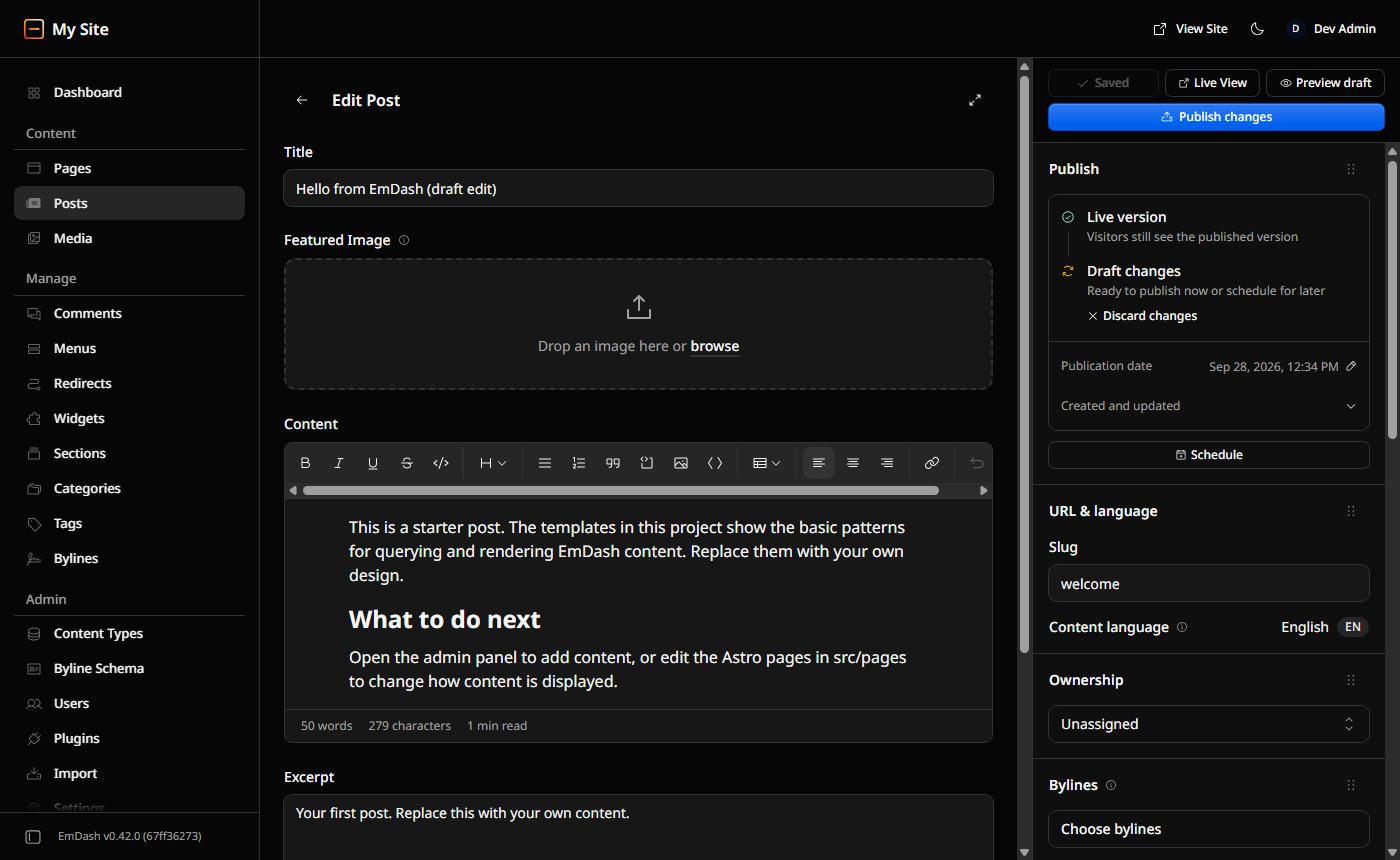
The saved draft holds the new title. The panel on the right states that visitors still see the published version.
3. Open the draft preview without an account. Preview draft opened the post with a signed _preview parameter. Its payload carries an issue time and an expiry one hour later, matching the documented default lifetime. A signed-out request with that link received the draft title, so anyone holding the link can read the draft until it expires. Changing one character of the signature returned the published version. A second link, generated with the documented getPreviewUrl() helper and a five-second lifetime, showed the draft and then the published version seven seconds later. The preview response carried cache-control: private, no-store. The Starter’s page did not add a noindex directive. Expiry limits subsequent access through the link; it cannot retract content already copied or indexed. Treat preview links as confidential, and verify both access controls and indexing directives for your deployment.
4. Change the content model. An optional text field was added to Posts with the emdash schema add-field command as the admin. It appeared in the editor at once. In git, only the generated emdash-env.d.ts changed; seed/seed.json did not. Running emdash export-seed wrote the model with the new field, so a team that wants schema review needs to commit that export or a scripted sequence of schema commands. The live change had already happened by then.
5. Restore an earlier revision. Selecting Restore this version on the original post in its revision list restored that revision. The restore created pending draft changes, and the public page kept the published title until Publish changes was selected again. Recovery of published content is therefore a two-step action: restore, then publish.
6. Move the whole site into a second instance. emdash site export produced a 27 KB package of 15 files. A second, empty EmDash site was set up without sample content. emdash site import --analyze returned a plan with no blockers or warnings and matched the one author to the target’s admin by email address. Executing that plan returned a receipt marked verified. The second site served the edited post with the same entry ID, and its Posts collection included the field added in step 4. User accounts did not move; the target kept its own admin, as the site transfer guide describes.
A limitation in the tested template. At commit 09decff, the Starter’s .gitignore excludes data.db but not data.db-wal and data.db-shm, the write-ahead log and shared-memory files SQLite keeps beside the database. With the dev server running, git add -A staged the WAL file. It contained the admin’s email address and post content. Check for data.db-* in .gitignore before the first commit. The 1.0.1 run below found the same gap in the stable scaffold.
Not tested in this run: passkey or SSO sign-in, roles below Admin, translations, plugins and the sandbox, the WordPress importer, MCP access, scheduled publishing, Cloudflare deployment, production caching, and a database backup restore. Where these topics appear on this page, the claims come from the documentation. The current authentication guide permits sharing an invitation link when email is not configured.
Stable release check: EmDash 1.0.1, 1 October 2026
The second run used create-emdash and emdash 1.0.1 with the setup of the first: the Starter template, Node.js, SQLite and local media, on Windows 11 with Node 22.22.3 and Astro 7.3.5. The scaffolder fetched the Starter from the templates repository at commit 1930243, the copy synced from 1.0.1 on 28 September. Sign-in again used the development bypass, so passkeys stayed untested.
The publishing loop behaved as it did on 0.42.0. A saved draft left the published title on the public page. A preview link showed the draft to a signed-out request, and a 30-second link returned the published version once it had expired. Changing one character of the signature, or lengthening the expiry inside the token, also returned the published version. Publish changes reached the public page without a rebuild, and a restored revision waited as a draft until it was published.
Previews carry no indexing directive. EmDash’s request middleware adds Cache-Control: private, no-store to a valid preview and keeps it out of the route cache. Neither EmDash nor the Starter adds noindex to it. Public pages carried no Cache-Control header on the development server or on a local production build served by Node, so caching is left to the deployment.
SEO fields skip the draft step. On a published post, a new meta description and the Hide from search engines switch each reached the public page as soon as they saved, without Publish changes. A team that reviews SEO changes before release should test this in its own workflow.
A site package now carried media. The export held 18 files and 89,088 bytes, including an image used as a post’s featured image. An empty second site imported it with a verified receipt. The post kept its entry ID, the image kept its media ID and arrived byte for byte, and the second site kept its own admin account. The second site did not accept a preview link signed by the first.
A database backup brought back the whole site. With the first site stopped, its data.db, the -wal and -shm files, the upload directory and EMDASH_ENCRYPTION_KEY went into a fresh 1.0.1 project, following the backup guide. Content, media and revision history came back, and so did the admin account, under its original ID. The first site’s preview links worked there too, because the signing secret is stored in the database. A site package moves content into another site; recovering a site needs the database copy.
The SQLite sidecar gap is still in the template. The 1.0.1 Starter’s .gitignore lists only data.db. With the server running, git add -A staged data.db-wal and data.db-shm again, and the WAL held the admin’s email address and post content. EmDash fixed its template folders on 30 September in pull request 3621. create-emdash downloads templates from the separate emdash-cms/templates repository, which had not been synced since 1.0.1 when this ran, so new sites still received the old file. On 7 October a site created with create-emdash 1.2.0 still did.
Importing a WordPress site: 6 of 11 old URLs needed redirects
WordPress 7.1.2 built a small synthetic site in WordPress Playground and exported it with its own exporter. The site has six posts in four statuses and two pages, one nested under the other. It has two authors, a nested category, and four image attachments: two of them are the same file uploaded twice, and two images sit in content at resized sizes. It also has internal links, a post renamed after publication, and date-based permalinks. The export went through the admin’s file upload; the route through the EmDash Exporter plugin was not tested. In 1.3.0, exporter imports report a Cloudflare bot challenge separately as WP_SITE_CHALLENGE with status 502; that release-note behaviour is documented here and was not tested in the local run.
The media step needs a public WordPress address. EmDash downloads each attachment from the WordPress site. Asked to fetch from localhost, 127.0.0.1, a private network address or a nip.io name, the media step refused each one with a “Blocked” error, so a WordPress copy on a laptop cannot supply the media. The run served the uploads folder through a temporary public tunnel for that step and closed it afterwards. In a production migration, keep the live WordPress site reachable until the media step finishes, as the importer guide asks.
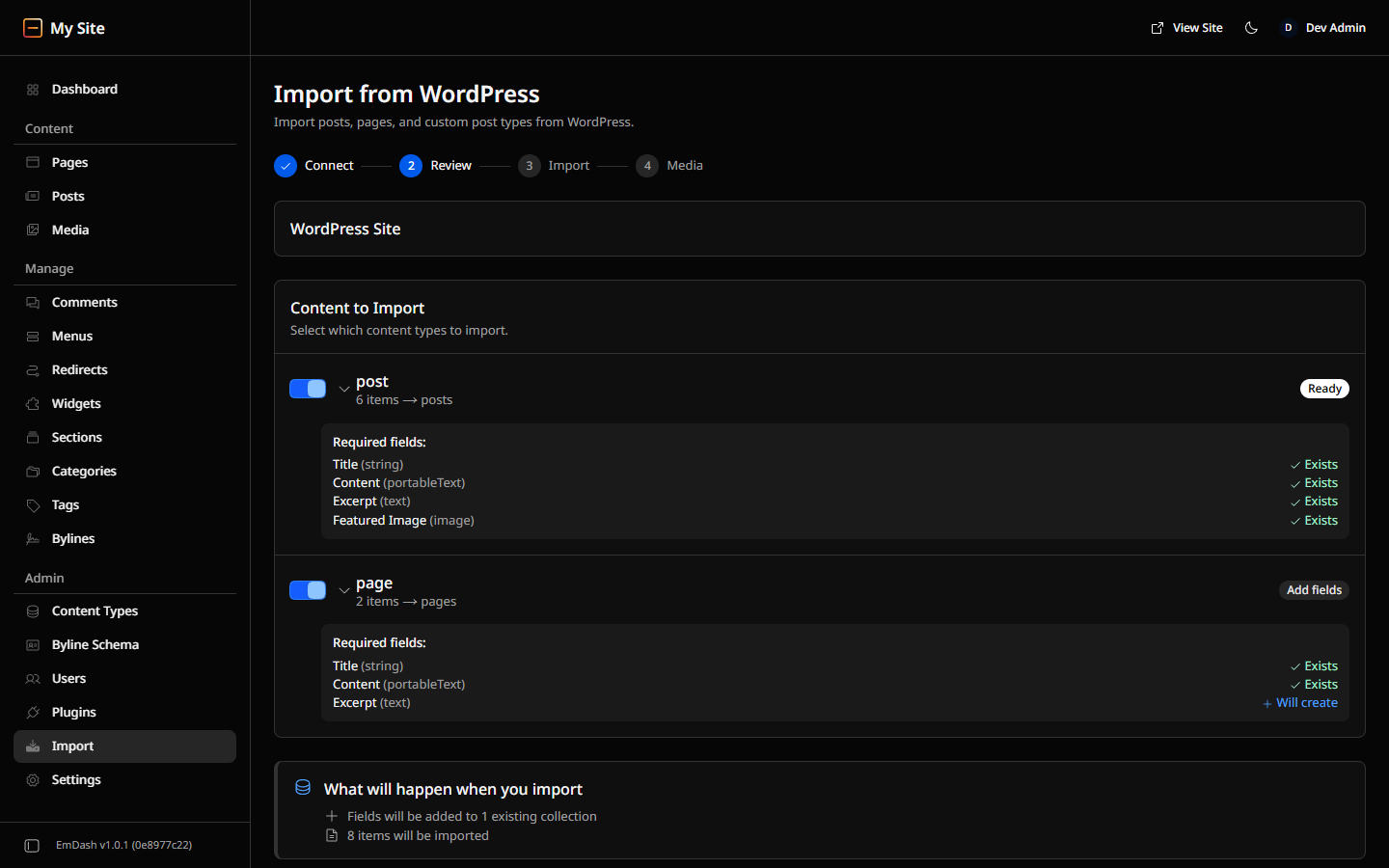
The review step maps each WordPress post type to a collection and lists the fields it will create.
| Check | Expected | EmDash 1.0.1 |
|---|---|---|
| Published posts | 3 | 3 |
| Drafts: one draft, one scheduled, one pending review | 3 | 3, without the schedule |
| Published pages | 2 | 2 |
| Media items from 4 attachments, 3 distinct files | 3 | 3, each matching its file by SHA-1 |
| Images in content pointing at EmDash media | 3 of 3 | 3 of 3; resized versions replaced by the originals |
| Internal links pointing at the new routes | 3 of 3 | 0 of 3 |
| Old public URLs reaching their content | 11 of 11 | 5 of 11; all 11 after adding redirects |
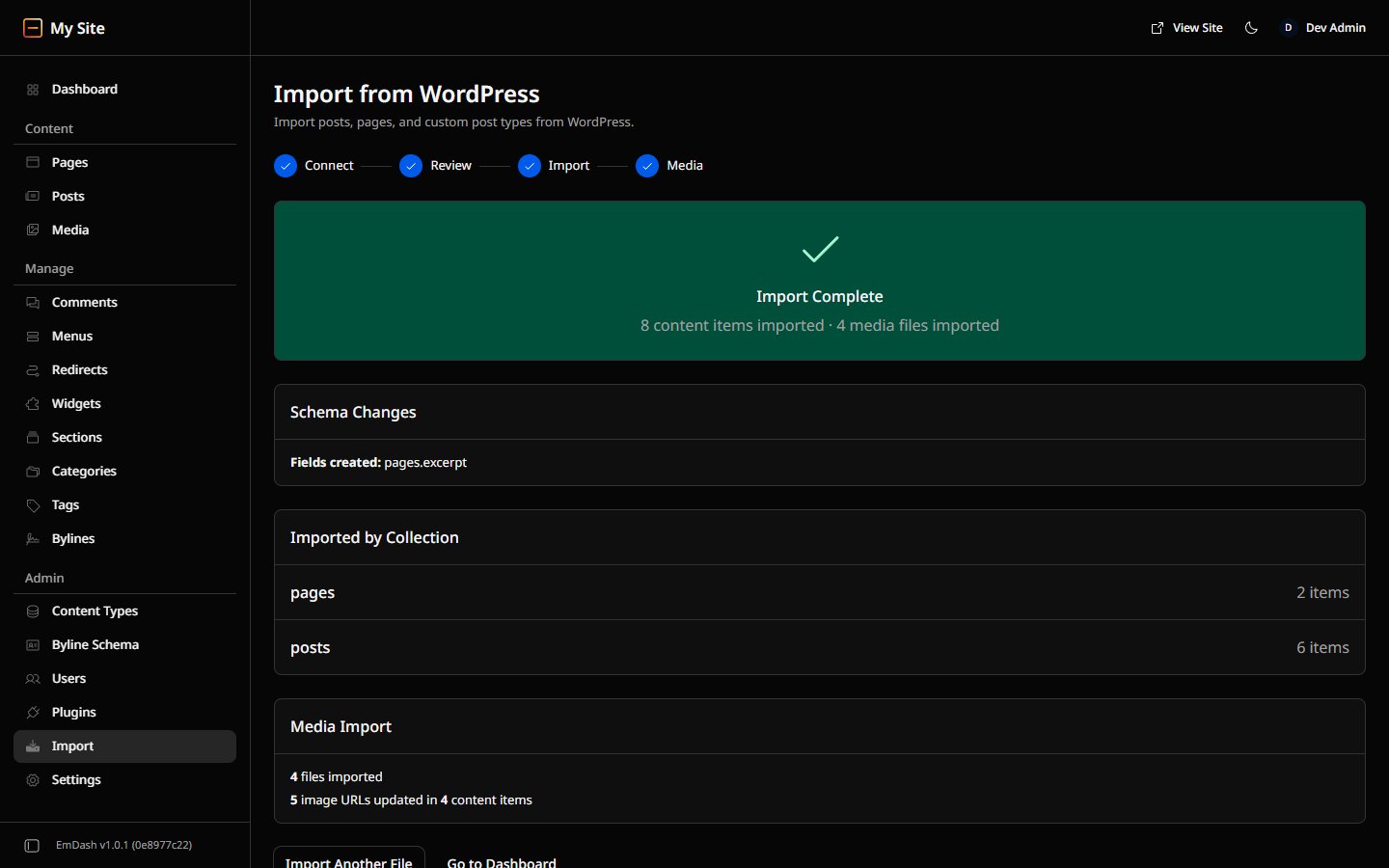
The summary counts the 4 attachments it processed. The media library holds 3 items, because the duplicate file was stored once.
Other changes in the import:
- The pending post had no slug in the export, because WordPress clears it when a user who cannot publish submits a new post for review. EmDash generated one from the title.
- The nested category lost its parent.
- The link around one image, pointing at its full-size file, was dropped. Alt text and captions in content came through, but the media library items have no alt text.
- Featured images are stored as URLs, with no link to the media library items.
- The author mapped to an EmDash user kept the WordPress display name as the byline. The unmapped author became a guest byline.
- Drafts have no GMT date in WordPress, so their created dates came from WordPress’s local time read in the server’s time zone: two hours early on the test machine.
URLs need their own plan. The importer created no redirects, and the Starter’s routes differ from WordPress permalinks. Requested on the EmDash site, three post permalinks, the renamed post’s old URL, the nested page and the nested category returned 404, and EmDash’s 404 log under Redirects listed them. Five 301 rules fixed all six. Two pattern rules send /[year]/[month]/[day]/[slug] to /posts/[slug], and three exact rules cover the old slug, the page and the category. EmDash matched an exact rule with or without a trailing slash, and a pattern only in the form it was written. WordPress permalinks end in a slash, so the pattern needed that form as well. On 1.2.0 a pattern written without the slash matched both forms.
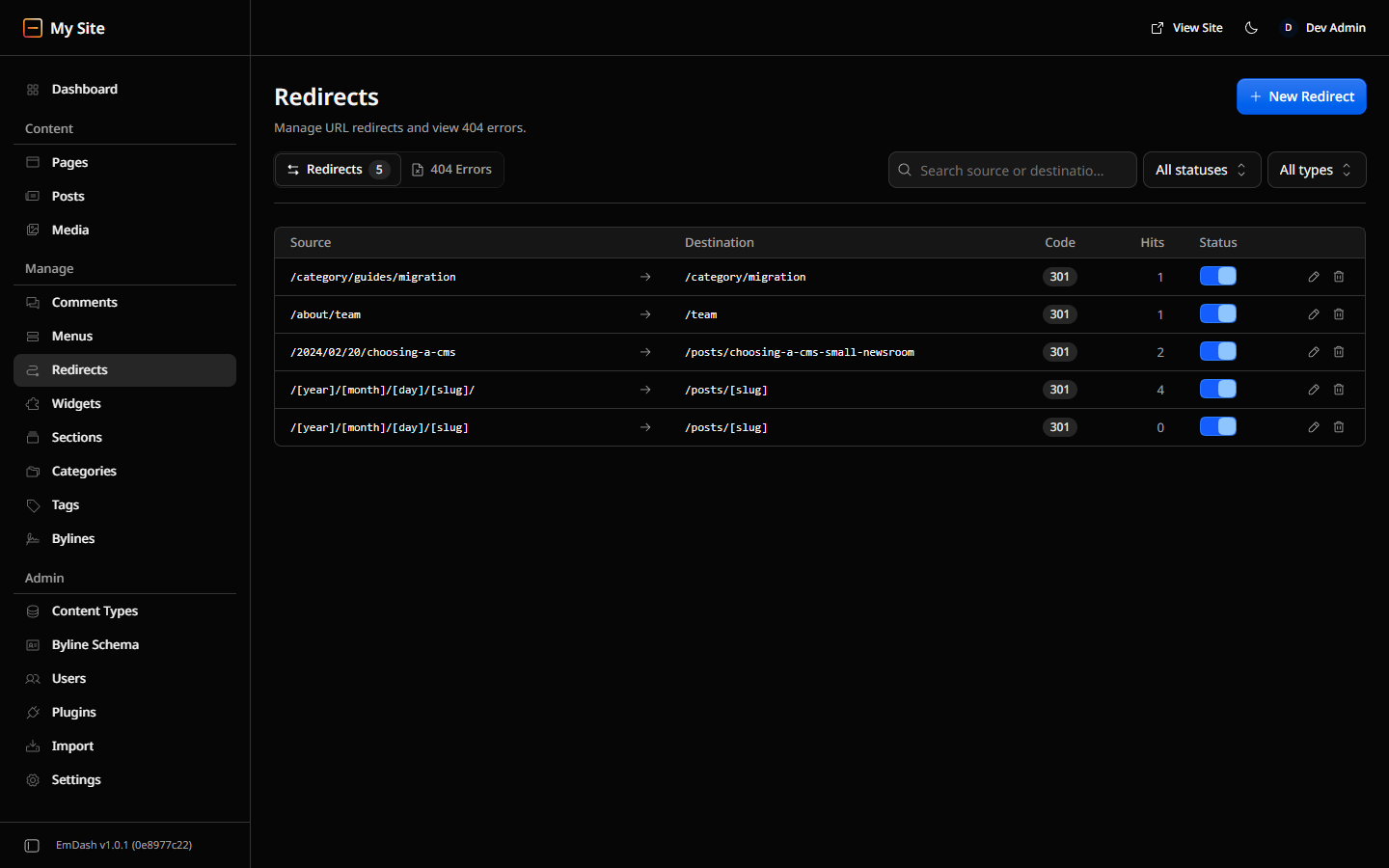
Five redirect rules covered every old URL in the fixture. The hit counts come from the check script’s requests.
The links inside the content still pointed at the old WordPress addresses in the 1.0.1 run. On the same domain all three reached their pages after the repair, two of them through those redirects; rewriting the links removes the extra request. In 1.3.0, WXR source-domain links are documented to become root-relative while the original WordPress permalink shape is retained. Uploaded-file links stay absolute and reusable-block sections are excluded from that rewrite. Routes that differ from the retained permalink shape still need redirects.
Download the WordPress import fixture to repeat the test or adapt it to your own export. It holds the Playground blueprint that builds the WordPress site, the recorded export, a script that compares an EmDash site with its WordPress source through the API and plain HTTP requests, the redirect script, and the reports from before and after the redirects. It needs Node.js and, for the media step, a temporary public address; the README lists every command.
What the two runs covered
“Documented only” means this page describes the feature from EmDash’s documentation.
| Area | 0.42.0, 28 September | 1.0.1, 1 October |
|---|---|---|
| Drafts, preview links, publishing, revision restore | Tested | Tested |
| Cache headers and indexing directives on previews | Tested | Tested, also on a local production build |
| SEO fields on a published entry | Not tested | Tested |
| Content-model change through the CLI | Tested | Not repeated |
| Site package export and import | Tested, no media | Tested, with media |
| SQLite database and media backup restore | Not tested | Tested |
| WordPress import from a WXR file | Documented only | Tested, synthetic site |
| WordPress import through the Exporter plugin | Documented only | Documented only |
| Scheduling, roles below Admin, translations, plugins, MCP | Documented only | Documented only |
| Passkeys, SSO, Cloudflare deployment | Documented only | Documented only |
| Production caching, performance and scale | Not tested | Not tested |
What changed in 1.2
EmDash 1.2.0 was published on 6 October 2026. A check on 7 October retested the parts of the earlier runs that its release notes touch, on a fresh 1.2.0 Starter with Node and SQLite. It reused the WordPress fixture from the 1.0.1 run with two posts written in the Classic editor added, and skipped the media step. The rest of this page keeps the version it was measured on.
| Check | EmDash 1.0.1 | EmDash 1.2.0 |
|---|---|---|
| Post scheduled for 1 December 2026 | Imported as a draft, without its date | Imported as scheduled for that date |
| Classic-editor table with text in its cells | Not in the fixture | Imported as a table, with its header row, bold text and link |
| Classic-editor table with a merged cell | Not in the fixture | Imported as one paragraph, the cell text run together |
| Redirects created by the import | None | None |
| Links between posts and pages | Left on the old WordPress address | Left on the old WordPress address |
| Nested category | Imported without its parent | Imported without its parent |
| Pattern redirect written without a trailing slash | Matched only that form | Matched both forms |
| Preview link on a list page | Not tested | Showed the previewed draft; signed out, the published version |
noindex on a preview response | None | None |
The importer guide still said on 7 October that scheduled dates are not reconstructed. The release notes and this run say otherwise for future dates; a post whose date has already passed still arrives as a draft, according to the notes. The notes also list the tables that keep the old output: cells holding images, headings or lists, merged cells, captions, footer rows, and tables inside a div or figure. After the media step, 1.2.0 points links to old uploads outside image blocks at the imported media, again according to the notes; this check did not run that step. Redirects and links between posts remain the project’s work.
Moving a site to a new domain now has a documented route. The Change domain dialog checks that the new address serves the site before it switches the Site URL, which emails, plugins, sitemaps, robots.txt, hreflang and canonical links set in the SEO panel then use (guide). Passkeys only work at the address where they were created. The administrator who moves the site carries their own sign-in over with a single-use link, and other users sign in by email and add a passkey at the new address. A launch that moves a site from a staging domain needs that step in its plan. On a site without siteUrl configured, check the Site URL field before upgrading, because email links follow it from 1.2.0.
Plugins registered in astro.config.mjs now run their install and activate hooks. On an existing site that happens at the first start after the upgrade, for every such plugin that was never enabled, disabled or given MCP access in the admin, so check before upgrading that each install step is safe to repeat. 1.2.0 also fixes a stored cross-site scripting issue in the editor toolbar, and a route cache storing pages rendered for signed-in users. The new admin.locales option limits the languages the admin interface itself is built in. It is a setting for the admin, separate from the per-locale content entries described above.
Upgrading to 1.2
Alongside 1.2.0, EmDash published upgrade-emdash 0.1.0. It updates the direct EmDash packages, refreshes the project’s agent skills and writes a work order, .emdash/UPGRADE.md, with every release entry the update crosses. It does not change application code, apply database migrations or deploy. The update guide covers the full sequence. In short:
- Run
npx upgrade-emdash@latest --dry-runand read the plan. - Run it without
--dry-run, then work through the project actions in the work order. - If the work order lists added core migrations, review them and take a restorable backup of the database and media before the upgraded site starts.
- Build the site and start it. Pending migrations run on the first request, so point a rehearsal at a copy of the data.
- Deploy that build, then check the admin, a public page, a disposable entry and a media upload.
From 1.0.x the update crosses the two core migrations that 1.1.0 added for redirects, so step 3 applies. Between 1.1.0 and 1.2.0 the source adds none. The command needs emdash 0.35.0 or later and does not support Yarn Plug’n’Play. Template files are not updated, and a site created with create-emdash 1.2.0 on 7 October still received the 1.0.1 Starter, .gitignore gap included.
What 1.2 changes in the recommendation. For a single Astro publication coming from WordPress, the import needs less repair: future schedules and simple tables come across, and one pattern rule covers both permalink forms. Redirects, links between posts and the category hierarchy still need the project’s own work. For the multi-brand organization below, nothing changes, because the release notes do not touch roles, a review state, multitenancy, SAML or support.
What changed in 1.3
EmDash 1.3.0 was published on 15 October 2026. EmDash 1.3.1 followed on 18 October. This section records the release notes and current documentation; it adds no new hands-on test.
The editor now shows readable revision history with the author’s name, highlights additions and removals, and keeps restore pending while a host callback completes. The revisions API and MCP revision_list also return the revision author when available. This improves editorial traceability; the existing revision-restore test above remains a 0.42.0 and 1.0.1 result.
Contributors can now save and edit their own drafts in the admin, REST API and MCP through content:edit_own_drafts. They still cannot edit published or scheduled entries or publish them. The fixed role model and lack of configurable review stages remain.
The WordPress importer now preserves WXR permalink shapes while rewriting source-domain links to root-relative paths. Uploaded-file links remain absolute, and reusable blocks imported as sections are excluded. Exporter bot challenges now report separately as WP_SITE_CHALLENGE with HTTP 502. These are documented 1.3.0 changes; the earlier 1.0.1 and 1.2.0 import results remain historical test evidence.
The practical upgrade concern is in 1.3.1: Workers in automatic migration mode return HTTP 503 until pending migrations are applied, rather than serving a successful response without content. Apply large migrations with emdash migrate before deployment where the release guidance calls for it, and use the Worker log when a site reports 503. The release also fixes stale cached site settings, including SEO verification tags, titles and logos, and fixes CLI use of EMDASH_URL and Cloudflare Access token refresh.
What 1.3 changes in the recommendation. EmDash is more usable for editorial traceability and contributor-owned drafts, and a WXR import now leaves fewer old-domain links to repair. It still needs a redirect plan for changed routes, explicit review of uploaded-file and reusable-block links, and an upgrade rehearsal with migrations applied before deployment. The 1.3.x claims here are documented and untested locally.
Is EmDash CMS good for enterprises?
For a single-brand Astro site with a known editorial team, it may already cover the requirements that matter. The architecture is compact, the editorial feature set is credible, localization treats translations as independently publishable content, and Cloudflare Access can provide an enterprise identity boundary on Cloudflare deployments.
I would not make it a general enterprise default today. EmDash uses five fixed hierarchical roles, from Subscriber through Admin. Payload can run access functions at the operation, collection, document, and field level. That difference becomes material when an organization needs regional permissions, field-specific controls, or rules that depend on the document and user together.
Approval is the second gap. A Contributor can create and save their own draft, while the content lifecycle still has no review state: an entry is draft, scheduled, or published. A plugin can add an approval step through the content-policy hook, which can reject publication until a condition is met. That is custom work to specify, build, and maintain.
I also found no documented first-class multitenancy feature in the complete EmDash documentation index. I could not find a public enterprise support plan, SLA, compliance certification, or native SAML documentation either. These are procurement and operating requirements for many enterprises, even when the software itself covers the publishing workflow.
Recovery needs a closer look. The backup documentation covers downloadable JSON archives, daily archives, database dumps, and D1 Time Travel, the point-in-time recovery for Cloudflare’s D1 database. JSON backups are for inspection or custom tooling: EmDash does not implement restoring them, and they leave out authentication data, plugin settings, comments, redirects, media files, and more. Disaster recovery rests on a raw database backup, a separate media backup, and the encryption keys. Site packages, added in 0.40.0, move a whole site’s content, model, settings, and media into a new empty site, and they leave users, tokens, plugin data, and secrets behind. A production evaluation should include a restore drill using the chosen database and media storage.
When this review was first published, the project’s own secrets documentation said plugin secrets were stored unencrypted. Release 0.39.0, published on 23 September 2026, encrypts settings that a plugin declares as secret, using EMDASH_ENCRYPTION_KEY. Values saved by earlier releases stay readable until someone saves them again, values outside a declared settings schema do not use this path, and EmDash does not yet report which key IDs are still in use. Sandboxed plugins also receive fairly broad capabilities once approved. For example, content:write can edit any content.
Isolation varies by deployment. Cloudflare’s sandbox requires a Workers Paid plan and enforces per-plugin CPU and subrequest limits that the Node runner does not enforce. Neither mode enforces a separate per-plugin memory limit; Cloudflare’s platform isolate ceiling still applies. Native and in-process plugins run with full host access. Any enterprise security review should evaluate the actual deployment mode and every enabled plugin. The phrase “sandboxed plugins” does not describe one uniform guarantee.
An existing 0.x installation should follow the 1.0 upgrade guide: it identifies removed APIs, changed entry points and the need to rebuild migration manifests with the upgraded packages. Core migrations are forward-only, so rehearse the upgrade and recovery path on a copy first. Package updates leave copied template files unchanged. For later 1.x releases, the general update guide now covers the upgrade-emdash command; Upgrading to 1.2 summarises it. From 1.3.1, a Worker in automatic migration mode returns 503 until pending migrations are applied, so include emdash migrate in the release runbook where the release guidance requires it.
Scheduled publishing needs a process that keeps running: the Node deployment guide says scheduled tasks pause when every process stops or sleeps, and Cloudflare Workers need a Cron Trigger. Account recovery depends on email, and the authentication guide says a sole admin on a site without an email provider has to reset authentication through the database.
EmDash CMS vs Payload
The two sit differently against an Astro project. EmDash is the Astro site: the CMS, the admin panel, and the pages are one application. Payload’s app and admin run in Next.js and serve Astro and other decoupled frontends through REST and GraphQL, so an Astro site consumes Payload rather than containing it.
EmDash has the more accessible schema workflow for someone who is not a developer, provided they hold the Admin role. Payload puts the schema, migrations, hooks, and access rules in TypeScript. I prefer Payload’s model when content structure is treated as application infrastructure and changes must go through code review. I can see EmDash working better when content specialists need to shape the model directly and the team accepts a controlled admin workflow for those changes.
Payload has the stronger documented case for complex enterprise authorization. Its access-control functions can evaluate the current user and data at several levels, and its official multitenancy plugin applies tenant filters and access checks. Payload also markets enterprise SSO, audit logs, publishing workflows, and dedicated support. Licensed features and contract terms still need direct confirmation during procurement.
Both expose MCP, in different shapes. EmDash ships it in core, with OAuth 2.1 and PKCE, device flow, scopes, and revision tokens for optimistic concurrency. Payload offers it through its first-party MCP plugin, which can allow or disallow find, create, update, and delete operations per collection. A team building agent-assisted editorial operations in Astro should compare the two authorization models directly rather than read MCP as a point of difference on its own.
EmDash documents Cloudflare Workers with D1 and R2, Cloudflare’s SQL database and object storage, plus Node deployments using SQLite, libSQL, or PostgreSQL and local or S3-compatible media. Both routes deploy to your own Cloudflare account or server, and I found no managed EmDash hosting offer in the documentation or on the homepage. Payload can run on suitable Next.js infrastructure and remains self-hostable. Its current get-started page offers Vercel and Cloudflare templates and enterprise hosting with Payload, alongside self-hosting. Confirm the hosted service’s scope and commercial terms for your project.
Self-hosting still leaves a choice about who operates the application. An internal platform team or a delivery partner can run it, and editors work in the admin either way.
Two decision scenarios
Both scenarios are illustrative. They are not client projects, and the only hands-on evidence behind them is the local runs above.
A small Astro publication with straightforward publishing
A magazine site in one language, built on Astro, with three people publishing articles, images, categories, and the occasional scheduled post. One of them looks after the site’s structure. The archive may be coming from WordPress.
EmDash matches most of this in core. Drafts, preview links, revisions, and scheduling are documented, and the recorded 0.42.0 and 1.0.1 runs confirmed the draft, preview, publish, and restore loop. The person who looks after the structure needs the Admin role to add a field. Hosting can be one Node process with SQLite and local media, or Cloudflare Workers with D1 and R2. In the 1.0.1 run the WordPress importer moved posts, pages, terms and media; the redirects and the internal links were left to the team.
The costs to plan for are an email provider for invitations and account recovery, a database and media backup routine, and a staging check and release-note review for upgrades. A second-person approval step is not built in, so decide whether this team needs one before choosing.
EmDash 1.0 is a reasonable candidate here, subject to testing the production release with the team’s own content and deployment. Payload also fits this site when the developers want the schema under code review from the start; it runs as a separate Next.js application beside the Astro site, which someone has to deploy and operate. Prototype EmDash with one of your own article types, pin the package version and the template commit, and rehearse a backup restore before launch. Keep the current site while it depends on WordPress plugins for memberships, advertising, or forms, until each has an EmDash equivalent you have tested. The importer moves content, and plugin behaviour has to be rebuilt or replaced.
A multi-brand organization with approval, localization and integration requirements
Three brands, five locales, and regional editors who may edit only their own brand and region. Legal approves before anything goes live. Staff sign in through the corporate identity provider over SAML. Product data comes from a PIM, and forms feed a CRM.
EmDash’s roles are five site-wide levels, so “edit only brand A in Germany” has no built-in expression. With no multitenancy feature, each brand becomes a separate installation or a custom plugin project. Legal approval needs a content-policy plugin. SSO works through Cloudflare Access with group mapping when the site runs on Cloudflare, and native SAML is not documented. Integrations can run as plugins with declared capabilities or through the REST API. Its per-locale entries do suit regional teams that publish on their own schedule.
Payload covers more of this list in documented core features and first-party plugins: access functions that can check the user together with the document’s brand and locale, the official multi-tenant plugin, and field-level localization. SSO, audit logs, and approval workflows sit in Payload’s enterprise offering, which starts with a demo request, so confirm their scope and cost there. The organization can choose self-hosting operated by its platform team or a delivery partner, or discuss Payload’s current enterprise hosting offer.
For this organization, Payload, or another platform whose approval and permission model you have verified, is the better-documented choice. EmDash would need custom approval and permission work plus separate installations per brand. A request for custom roles is open on GitHub, so check its current status against your permission requirements. If the current platform already enforces approvals and SSO and the pain lies elsewhere, such as frontend performance, fix that first; changing the CMS alone would not address it.
An evaluation sheet for your own content
Run these checks with your own content, your editors, and the deployment mode you intend to use. Score each pass, partial, or not demonstrated, and record any configuration or custom work. A feature you did not test stays unverified.
| Check | What to do with your content | Status in the recorded runs |
|---|---|---|
| Install and pin | Scaffold with the intended template and hosting target. Record the emdash version and the templates commit. | Tested locally on 0.42.0 and 1.0.1, Node and SQLite |
| Edit and preview | An editor changes an existing page and shares a preview link. Open it signed out, then after expiry. | Tested on both: draft kept off the public page; signed link readable by anyone who holds it until it expires; on 1.2.0 the link also shows the draft on list pages |
| SEO changes | Change an SEO field on a published page. Record when visitors see the change. | Tested on 1.0.1: live without publishing |
| Review and approval | Try to publish as a role that should not publish. Record what stops it. | Documented only: no review state, approval via a policy plugin |
| Permissions | Map each editor to one of the five roles. List any rule a role cannot express. | Documented only |
| Translation | Publish one locale while another stays in draft. Check fallback on the public route. | Documented only |
| Schema change | Add a field on staging and repeat the change on production through a script or seed export. | Tested on 0.42.0: live immediately, seed file unchanged until exported |
| Recovery | Restore a revision, then restore the database and media into a fresh environment. | Revision restore tested on both; SQLite database and media restore tested on 1.0.1 |
| Plugins | Install the plugins you need in the target deployment mode. Record each capability they request. | Not tested |
| Sign-in and recovery | Set up the real sign-in method and recover a lost passkey. | Not tested |
| WordPress import | Import a representative export with its media. Compare counts, images, links, authors and terms with the source. | Tested on 1.0.1 with a synthetic site: counts and media matched; internal links and the category hierarchy did not carry over. On 1.2.0 a future schedule and a simple Classic table did, and the links and hierarchy still did not |
| Old URLs | Request every old URL on the new site, add redirects for the failures, and request them again. | Tested on 1.0.1: none redirected by the import; five rules covered the fixture. On 1.2.0 one pattern rule covers both slash forms |
| Exit | Export a site package and import it into an empty site on another database. | Tested on both, same database type; with media on 1.0.1 |
Download the editable EmDash evaluation sheet to fill in during the session. The five editorial tasks in the Astro CMS guide give a like-for-like script if Payload or another CMS is also on the shortlist.
My current recommendation
EmDash is worth testing for new Astro sites. In the recorded 0.42.0 and 1.0.1 runs, the core publishing loop behaved as documented: drafts stayed off the public page, preview links were signed and stopped working at expiry, restores went through a draft, and a whole site moved into a second instance with a verified receipt, media included on 1.0.1. A WordPress import moved the content and media of a test site and left its URLs to the team. Release 1.2.0 made that import need less repair, and 1.3.x adds documented revision authors, contributor-owned draft edits and WXR link rewriting. Those 1.3.x changes were not retested here. I would start with one representative content type, a preview and publishing flow, one translation, the intended SSO path, a realistic plugin, and a backup restore drill. The actual editors and security team should use that prototype. For a move from WordPress, add an import of the real export and a request for every old URL.
For a project that needs fine-grained permissions, first-class multitenancy, formal compliance evidence, or contractual support, Payload has the stronger documented position today. EmDash becomes more convincing when the project is already committed to Astro and values its visual schema workflow, per-locale entry model, and built-in MCP access.
If you want help running that prototype, we can take your editors through the evaluation sheet with EmDash, Payload, or the rest of your shortlist.
Stable 1.0 makes EmDash a timely candidate for an Astro CMS evaluation. The deciding evidence is how it handles the project’s publishing, access, integration and recovery requirements. Use the prototype to establish that fit.
Local evaluations recorded on 28 September 2026 using emdash 0.42.0 and the Starter template at commit 09decff, and on 1 October 2026 using emdash 1.0.1 and the Starter template at commit 1930243, both on Node 22.22.3. The WordPress fixture was built with WordPress 7.1.2 in Playground CLI 3.1.54. Release status, upgrade guidance and the cited hosting documentation rechecked on 29 September; the documentation cited for the 1.0.1 run read on 1 October. A check on 7 October 2026 used emdash 1.2.0 and the same Starter commit on Node 22.22.3; the 1.2.0 release notes and the change-domain, update and WordPress import guides were read that day. EmDash 1.3.0 and 1.3.1 release notes were read on 19 October 2026. The 1.3.x claims are documented only, not new hands-on tests. Scenarios are illustrative.
We're booking content platform
engagements for 2026.
Twenty-five minutes to walk through the work and decide if we're the right team for it. Scoping and a fixed price come after.